On this page
What this is for
A snapshot is a frozen, point-in-time copy of an educator's credential record, captured automatically the moment they leave your centre. It preserves exactly what you held on file on their last day - so if a regulator ever asks who was compliant while they worked with you, the record is still there, unchanged.
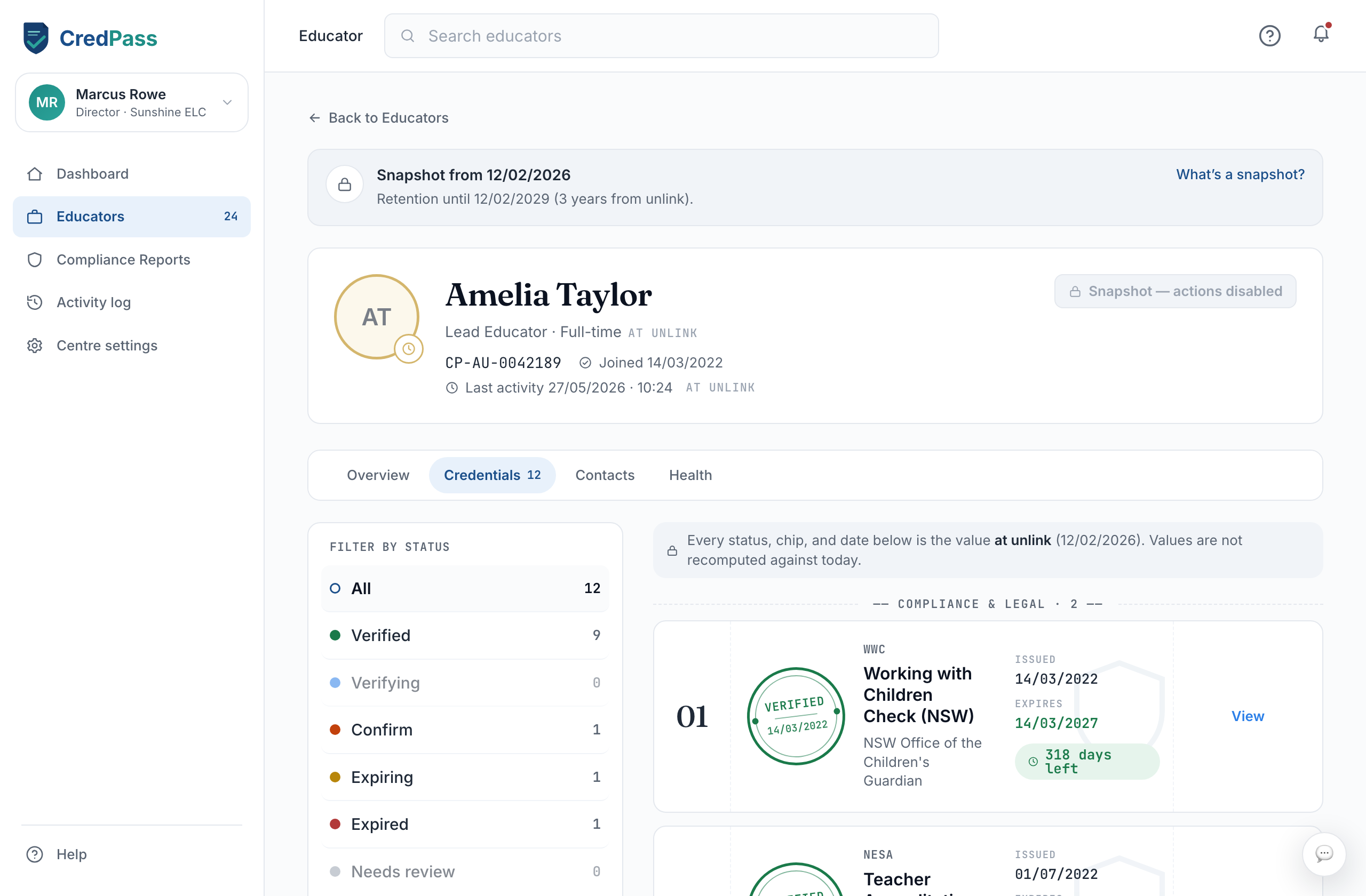
How a snapshot is created
You do not create snapshots by hand. When an educator is unlinked from your centre - because they resign, finish a contract, or you remove them - CredPass freezes their record at that instant and moves it to your Archive. The snapshot is stamped with the date it was taken and who unlinked them, so the record is self-explanatory later on.
What's inside a snapshot
A snapshot holds the same tabs you saw while the educator was active - credentials, overview, contacts and health - but every value is read-only and marked with a lock. Nothing in a snapshot can be edited, and it never updates again, even if the educator later renews a credential somewhere else. It is a true record of that moment, not a live profile.
Retention and deletion
Every snapshot is kept for three years from the day it was taken, which covers the usual record-keeping window. A banner at the top of each snapshot shows the retention date; in the final 30 days it turns amber and counts down. When the three years are up, CredPass deletes the snapshot automatically - you do not need to clean anything up.