What this is for
If you cannot remember your password, you can reset it yourself from the sign-in screen - there is no need to contact support. CredPass emails you a secure, single-use link to set a new one.
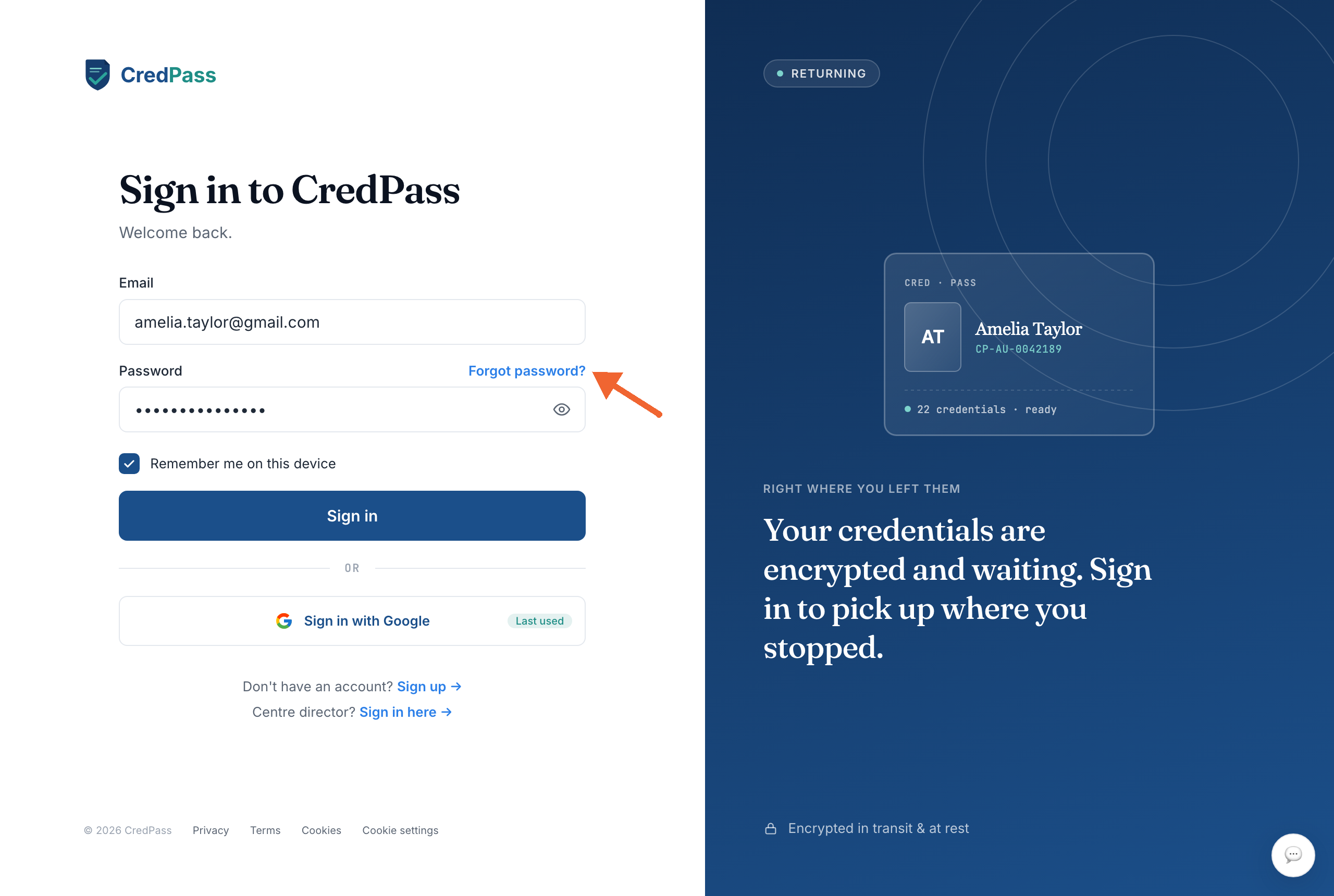
Step by step
- Go to the CredPass sign-in page and select Forgot password?, just above the password field.
- Type the email address you use for CredPass and submit. If an account exists for it, a reset email is on its way.
- Open the email from CredPass and follow the reset link. If it is not there within a few minutes, check your spam or junk folder.
- Set a new password and confirm it. The link is single-use and expires after a short time, so finish in one go.
- Sign in with your new password - you are ready to go.
Good to know
The reset link is time-limited and can be used only once - if it expires, just request a new one from the same screen.
Signed up with Google? You do not have a CredPass password - use Sign in with Google on the sign-in screen instead.
For your security, resetting your password signs you out on your other devices.
Questions
I didn't get the reset email.
Check your spam or junk folder and make sure you used the email address on your CredPass account. The email usually arrives within a few minutes; if not, request the link again.
I signed up with Google - how do I sign in?
You don’t have a separate CredPass password. Use the Sign in with Google button on the sign-in screen.
Can I change my password while signed in?
Yes - open Settings and update it from your account. A reset is only needed when you can’t sign in.